ComplianceUpdated 12 min read
PT27, PT28 and PT33 in Thailand: a practical guide
PT27 (ภ.ท.27), PT28 (ภ.ท.28) and PT33 (ภ.ท.33) are different records in Thailand’s medical cannabis system. PT27 explains where controlled cannabis came from, PT28 explains how it was used or supplied, and PT33 is the medical prescription supporting a patient’s treatment.

What is PT27 (ภ.ท.27)?
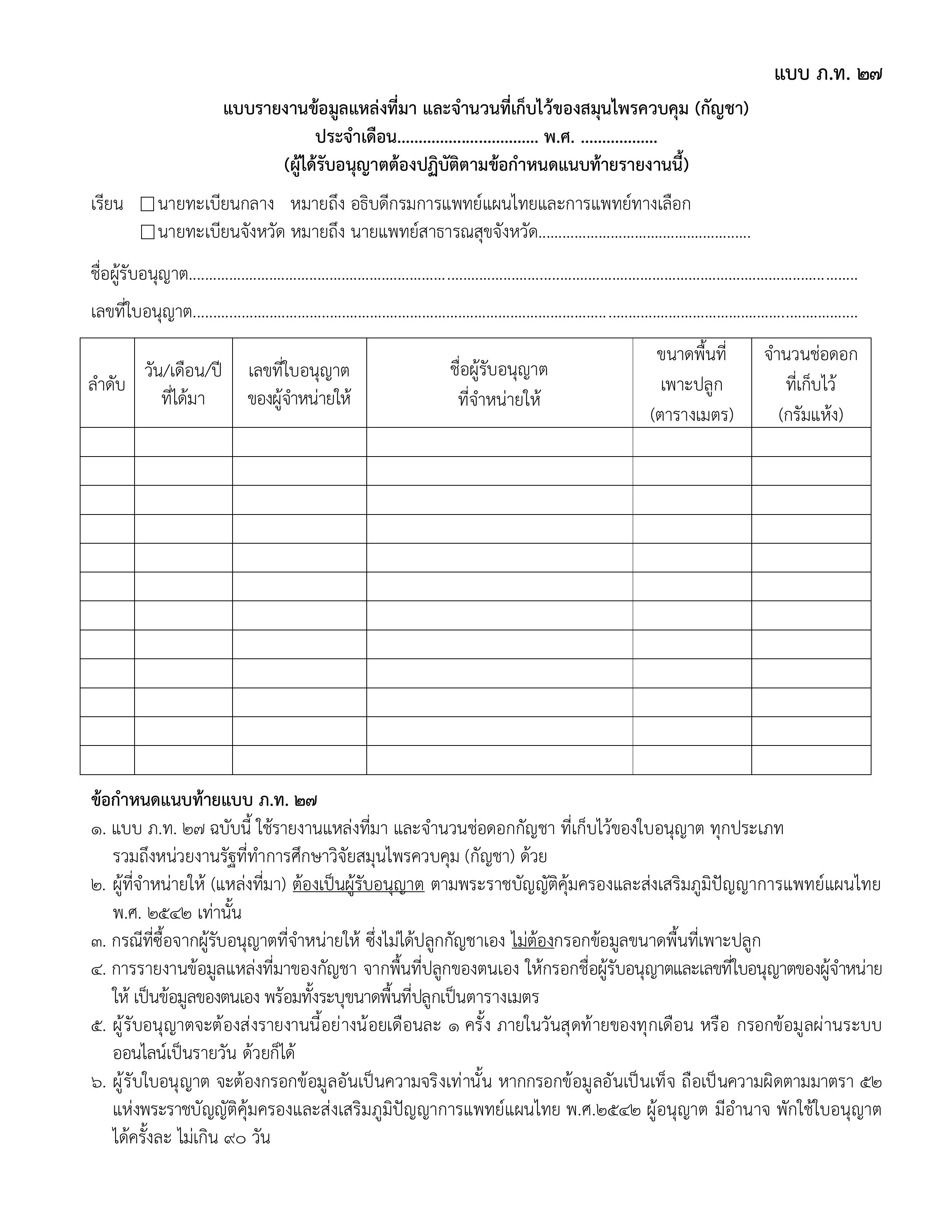
Open the official Thai-language PT27 form (PDF)PT27 is the report of the source and quantity of controlled cannabis kept at a licensed establishment. In practical terms, it is the inbound side of the stock trail: what arrived, when it arrived, who supplied it, and how much is held.
The official PT27 form asks for details including the acquisition date, the supplier and supplier licence, cultivation area where relevant, and the quantity of dried flower in grams. DTAM’s current guidance describes PT27 as a monthly report, so the underlying receiving records need to remain complete throughout the month.
A purchase invoice alone is not a complete stock trail. The received batch should also stay connected to its supplier documents, quantity, receiving branch, and any later movement.
What is PT28 (ภ.ท.28)?
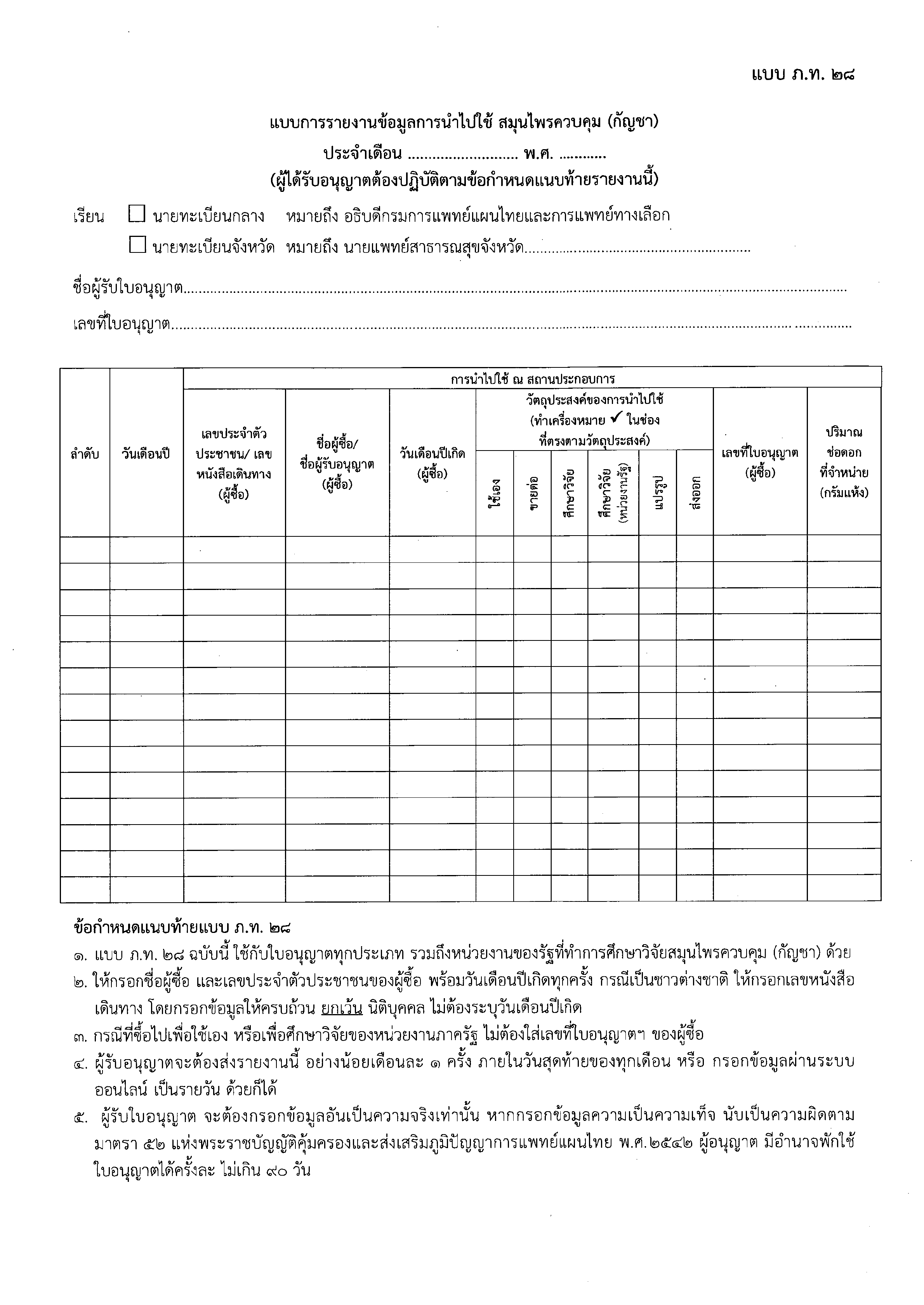
Open the official Thai-language PT28 form (PDF)PT28 is the report of how controlled cannabis was used at or supplied from the establishment. For a patient sale, it is the outbound side of the trail: which person received the cannabis, for what purpose, on what date, and in what quantity.
The official form includes fields for the buyer’s Thai ID or passport number, name, date of birth, purpose of use, and quantity. A business therefore needs more than a daily sales total. Each controlled movement must remain traceable to the relevant person or authorized recipient and the stock that left.
Sales are not the only movements that matter operationally. Returns, corrections, transfers, damage, and stock adjustments should remain visible rather than being used to overwrite the original history.
What is PT33 (ภ.ท.33)?
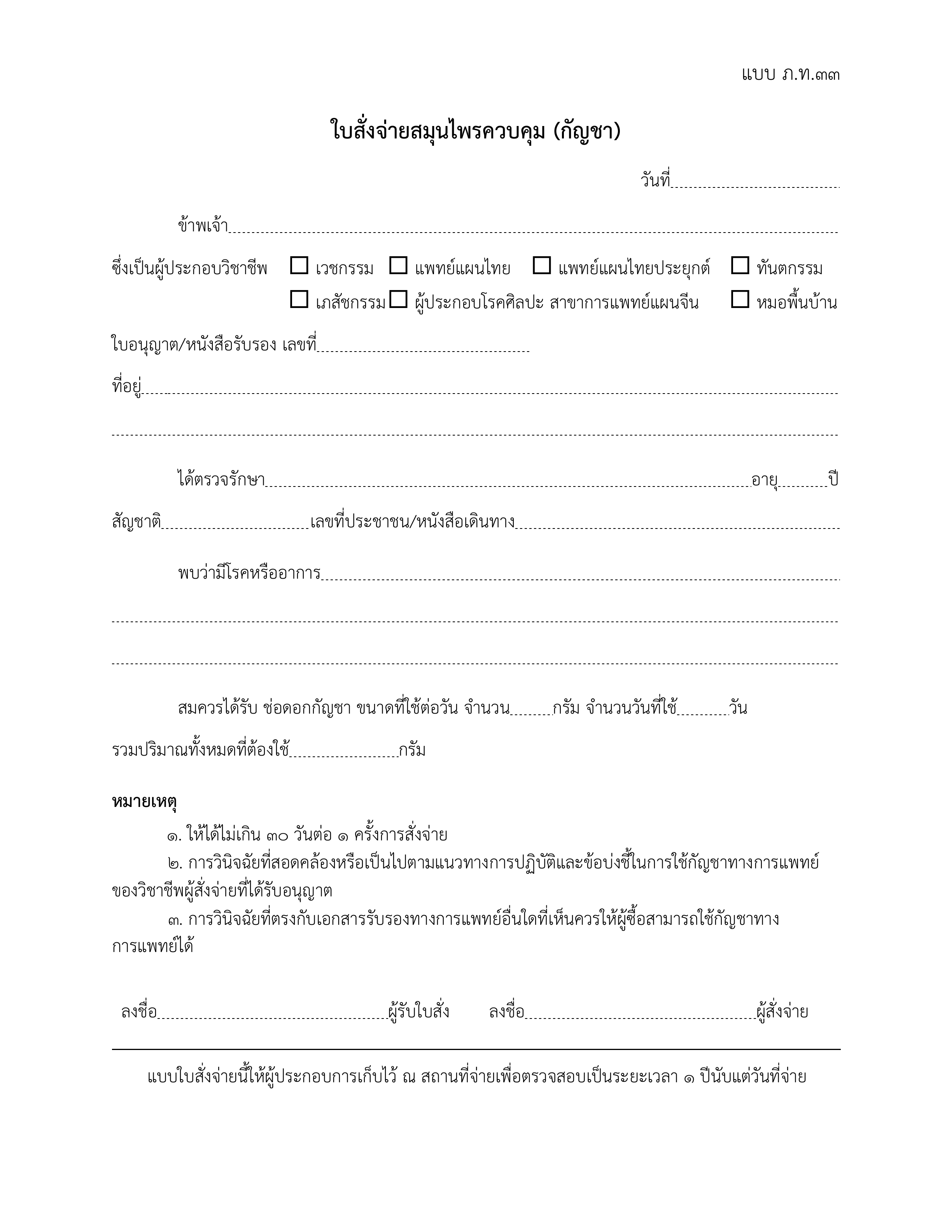
Open the PT33 reference form (PDF)PT33 is the cannabis prescription for controlled cannabis flower. An authorized practitioner issues it after a medical assessment; Cannabox MD provides the secure patient-intake and clinician-review handoff around that assessment. It is not a form that retail staff should create or approve themselves.
Use the linked Thai-language PT33 for official records.
Current DTAM guidance says the prescription records the patient’s identity, the clinical condition or symptoms, the daily quantity, the number of treatment days, and the total quantity prescribed. The same guidance limits each prescription to treatment for no more than 30 days and requires the prescription evidence to be kept at the dispensing location for inspection.
At checkout, staff need to confirm that the patient and prescription match the proposed sale. The sale should not exceed the quantity or treatment context authorized by the practitioner.
How do PT27, PT28 and PT33 connect?
Think of the forms as one record chain. PT27 establishes the lawful source and quantity received. PT33 establishes the medical reason and authorized quantity for the patient. PT28 records the resulting use or supply from the establishment.
A clean retail flow is: receive a named batch from a documented source; verify the patient and current PT33; complete the sale from that batch; create the receipt and stock movement; then use those records to prepare or review PT28.
The forms do not replace one another. A valid PT33 does not prove where the product came from, and a PT27 source record does not authorize a patient sale. The trail is strongest when the same transaction connects all three contexts without staff retyping them later.
What should a cannabis business record?
For stock received, keep the supplier identity and licence, source documents, receiving date, branch, product, batch, and quantity together. For a patient sale, keep the patient identity, verified PT33 context, product, source batch, quantity, receipt, payment, branch, and staff member together.
Record each event once, when it happens. Re-entering data from paper receipts into a separate spreadsheet at month end creates mismatches in names, dates, quantities, and batch references.
Access also matters. Patient and prescription information should only be available to people whose role requires it, while operational and compliance staff still need a reliable audit trail of who recorded or reviewed each event.
Check PT 11 licensing and renewal requirementsCommon mistakes that break the record trail
The most common problems are missing supplier licence details, receiving stock without a batch reference, selling from a generic product balance, attaching the wrong patient or PT33, recording only the receipt total, and editing a completed movement instead of posting a visible correction.
Another warning sign is a month-end balance that can only be explained in a private spreadsheet or chat thread. If the main operating record cannot show how opening stock became closing stock, the team is reconstructing the story instead of reviewing it.
What should be reviewed before reporting?
Reconcile each branch from opening stock through receipts, transfers, patient sales, other outbound movements, adjustments, and closing stock. Investigate negative stock, duplicate entries, missing batches, and records without the required source or patient context.
- Match the reporting month and year, licence holder, licence number, and registrar to the establishment you are reporting for.
- Check supplier and recipient details against source documents. Use the transaction dates within the selected reporting month.
- Check quantities in grams, remove duplicate entries, and investigate differences from the underlying records. PT27 and PT28 cover different movements; do not force their totals to match.
- Keep the supporting evidence for each row accessible to authorized staff. Check patient dispensing against the relevant PT33 before preparing PT28.
How to report PT27 and PT28
Before you submit PT27 or PT28 through the channel your responsible authority accepts, use the free PorThorOS generator to turn checked records into printable drafts. Review every line against your source evidence, then print or save each form as a PDF. The example below uses fictional names and identifiers. Do not copy it into a real report; the example quantity is not a medical recommendation.
The generator runs in your browser. You enter each record and print or save before leaving; reloading clears your entries. The tool sends no report data to DTAM and does not submit reports. It generates PT27 and PT28 only. An authorized practitioner remains responsible for PT33. Email signup is optional and excludes your report data.
PorThorOS automates reporting preparation around daily operations. It keeps supplier receipts and batch movements connected to PT33-checked dispensing, giving your team PT27/PT28 working records to review before filing. PorThorOS does not submit reports to DTAM or replace the operator’s compliance review.
DTAM controlled-herb portal ↗DTAM official PT27 and PT28 forms ↗DTAM reporting and record-retention guidance ↗
Choose the reporting period and establishment
Open the generator and choose PT27. Select August 2026 for this example, then enter the licence holder, licence number, and responsible registrar. Enter the province for a provincial registrar. The year field uses the Gregorian year (2026); the official preview shows the Buddhist year (2569). Use your own establishment details in a real report.
Enter one PT27 source record
For the fictional receipt, enter 5 August 2026, 100 grams, Demo Supplier (fictional), and the placeholder licence DEMO-SUPPLIER. Add the cultivation area only when it applies and you have the supporting figure. Use Add source row for the next receipt; you can reopen a collapsed row to check it.
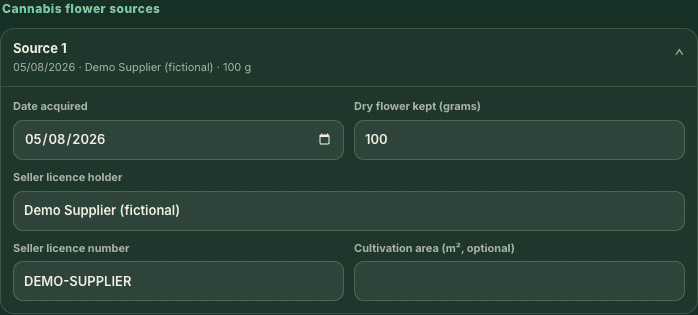
PT27 example using fictional data. DEMO-SUPPLIER is not a real licence number. View full-size image Enter one PT28 outgoing record
Switch to PT28 and enter the reporting period and establishment details in that tab too. For this fictional example, record 6 August 2026, 1 gram, Demo Patient (fictional), the placeholder identifier DEMO-PASSPORT, date of birth 1 January 1990, and Medical / personal use. In a real report, use the verified recipient details and documented quantity and purpose. Check the relevant PT33 for patient dispensing. Processing entries require a purchaser licence number.
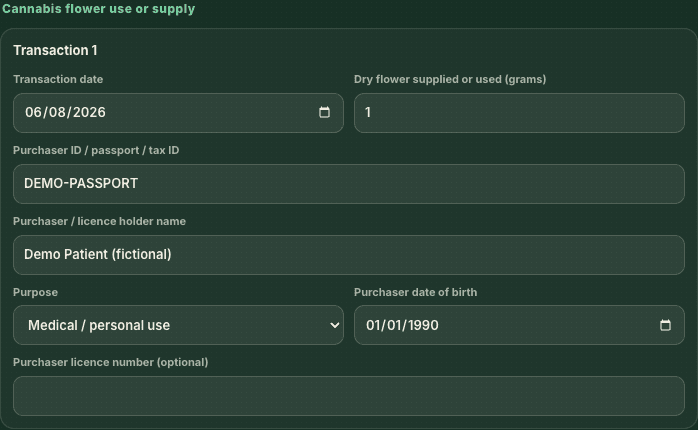
PT28 example using fictional data. This is not a prescription or dosage recommendation. View full-size image Review the official-form preview
Compare the preview with the pre-print checklist above and your source records. As you add more rows, use the page dots to review additional pages. Check names, dates, and quantities on each page. The free generator does not reconcile stock or verify licences and prescriptions for you.
Print or save each report
Choose Print / save PDF and select your printer or Save as PDF in the browser print window. Check the print preview for cut-off content. Print PT27 and PT28 separately, then open any saved files to confirm the pages are present and readable. Store the reviewed copies with the reporting month and supporting records where authorized staff can retrieve them.
Keep store records ready after reporting online
If you enter records in the DTAM portal, also check how staff will retrieve the accounts and evidence at the store. DTAM’s guide requires those records to remain available for inspection during opening hours. Printing with this tool does not confirm that you have submitted anything to DTAM.
We recommend checking and updating source records each day, then keeping reviewed PT27/PT28 copies accessible at the store. This recommendation is not a requirement to print both forms every day. Confirm the accepted paper or electronic format with DTAM or your provincial authority.
DTAM’s current guidance describes both reports as monthly and says they must be submitted to the responsible authority within one month after the end of the month. Confirm the current filing channel and any licence-specific instructions with DTAM or the responsible provincial public health office before the deadline.
Keep the submitted forms, acknowledgement or receipt, and the accounts and evidence supporting every line for at least three years so they remain available for inspection.
This guide explains the record flow; it is not legal advice. Cannabis rules and operating requirements can change, and the responsible authority should be treated as the final source for your business.
Frequently asked questions
What is the difference between PT27, PT28 and PT33?
Use PT27 to report cannabis sources and quantities held, and PT28 to report use or supply from the establishment. An authorized practitioner issues PT33 as the patient’s medical prescription. Keep the receiving and dispensing records connected to the supporting documents for each form.
How often do I need to submit PT27 and PT28?
DTAM’s guide describes both as monthly reports, due within one month after the end of the reporting month. Confirm the current filing channel and any instructions for your licence with DTAM or your Provincial Public Health Office. A daily record check helps you prepare for that monthly review.
Should the quantities on PT27 and PT28 match?
The two forms cover different movements, so their totals do not have to match. Reconcile opening stock, receipts, dispensing, transfers, adjustments and closing stock against the underlying records. Investigate unexplained differences rather than changing entries to make the forms agree.
Does the free generator send my reports to DTAM?
The generator prepares printable PT27 and PT28 drafts from the entries you provide. It does not send report data to DTAM or submit reports. Review each line, print or save the forms, then submit them through the channel your responsible authority accepts.
Will the free generator save my entries for my next visit?
Reloading the generator clears your entries. Print or save each completed form before leaving, and keep the source records you used to prepare it. Optional email signup excludes report data and does not save your draft.
